Lutshelf.cube

Free .cube files. No email, no account.

Free LUTs for photo and video

Color looks, tested before they go up

Lutshelf is a small library of free .cube LUTs. Each look gets previews on several different photos, a plain note on when to use it and when not to, and a check on six skin tones. If a look turns faces grey or orange, it doesn't get published.

The first looks go up in November 2026.

Files

Plain .cube downloads

33-point 3D LUTs that open in every major editor. One click, no sign-up, no newsletter.

Previews

More than one photo

A look that flatters a sunset can ruin a portrait. Every LUT is shown on portraits, night scenes, food and landscapes.

Log footage

A file for your camera

Looks marked for log come with versions for Sony S-Log3, Panasonic V-Log, Canon C-Log3 and Fujifilm F-Log2.

Guides

Step by step, per app

Where to put the file and how to tone it down, written separately for each editor.

How every look is checked

Skin first, then everything else

Each LUT runs through the same test before it can be published. Six skin samples, from very light to deep, go through the look. If the hue of any of them moves more than 7 degrees, or the color gets much weaker or stronger, the look is rejected and goes back for changes.

A grey ramp goes through it too. The tones have to stay in order from black to white with no jumps, which is what causes banding on skies and walls. Finally the test counts how many colors the look pushes into pure white or pure black.

Skin samples
6, very light to deep
Max hue shift
7°
Grey ramp
no reversals, no steps over 6%
Clipping
under 2% of colors
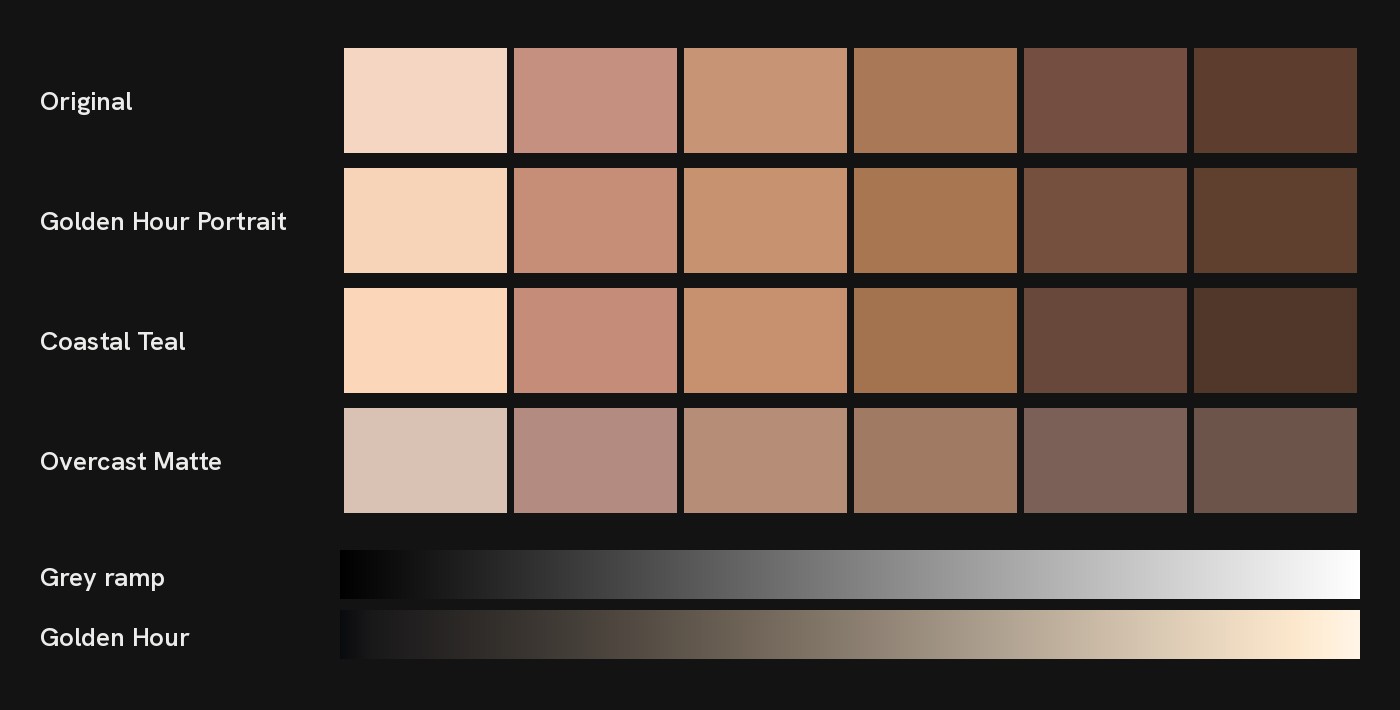
Six skin tone samples, light to deep, shown in their original color and after three test looks: Golden Hour Portrait, Coastal Teal and Overcast Matte. Below, a grey ramp before and after Golden Hour Portrait.
Three looks from the first batch on the six skin samples. Overcast Matte lowers color on purpose but keeps the hue in place.

What a LUT can and can't do

A look, not a fix

A LUT reshapes the colors it is given. If the clip is too dark or too blue, it stays too dark or too blue, now with a look on top. Fix exposure and white balance first, then add the LUT.

The looks here are built with color math, not with an AI model and not by measuring real film stock. When a look is described as film-like, that is a description of how it feels, not a claim that it matches a particular film.

Guides for

  • DaVinci Resolve
  • Premiere Pro
  • Final Cut Pro
  • CapCut desktop only
  • VN phone
  • Photoshop

CapCut's phone app can't import .cube files at the moment. The desktop version can, and VN on the phone can too.